











منتجات مشابهة





0.0
إجمالي 0 تقييم و 0 مراجعة
تفاصيل التقييمات
5 نجمة
0
4 نجمة
0
3 نجمة
0
2 نجمة
0
1 نجمة
0
AI Technology
pix-link
25,000دینار

الكمية:
1
عن المنتج:
قسم:الشبكات
SKU:WR16Q
مارکة:Other
الحالة:جديد
اللون:أسود
الوصف
Quick Setup Guide
Connection: Plug the device into a power outlet near your router. Connect your phone or PC to the WiFi network named SSID-XXXXX (found on the device sticker).
Access Interface: Open a web browser and enter http://192.168.7.1 (or setup.pix-link.net). The default login password is admin.
Configuration:
Select Repeater Mode.
Scan for your existing WiFi network and select it.
Enter your existing WiFi password and click Apply.
Placement: Once configured, move the repeater to a location halfway between your router and the dead zone.
Technical Specifications
Wireless Speed: Up to 300Mbps on the 2.4GHz band.
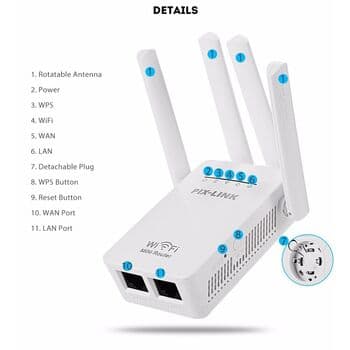
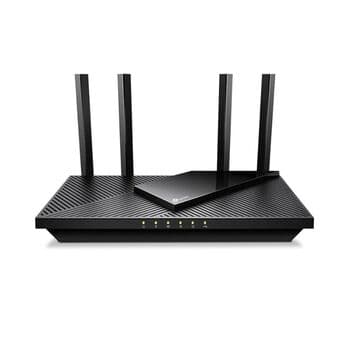
Antennas: 4 external high-gain antennas for 360-degree coverage.
Ports: 1 WAN port and 1 LAN port (10/100Mbps) for wired connections.
Modes: Supports Router, Repeater (Relay), AP (Access Point), WISP, and Client modes.
Security: Supports WPA/WPA2 and WPA-PSK/WPA2-PSK encryption.
Key Features
WPS Button: Allows for one-tap secure connection if your main router supports WPS.
Smart LED Indicators: Displays signal strength to help find the optimal placement.
Universal Compatibility: Works with any standard IEEE 802.11b/g/n wireless router or access point.
Connection: Plug the device into a power outlet near your router. Connect your phone or PC to the WiFi network named SSID-XXXXX (found on the device sticker).
Access Interface: Open a web browser and enter http://192.168.7.1 (or setup.pix-link.net). The default login password is admin.
Configuration:
Select Repeater Mode.
Scan for your existing WiFi network and select it.
Enter your existing WiFi password and click Apply.
Placement: Once configured, move the repeater to a location halfway between your router and the dead zone.
Technical Specifications
Wireless Speed: Up to 300Mbps on the 2.4GHz band.
Antennas: 4 external high-gain antennas for 360-degree coverage.
Ports: 1 WAN port and 1 LAN port (10/100Mbps) for wired connections.
Modes: Supports Router, Repeater (Relay), AP (Access Point), WISP, and Client modes.
Security: Supports WPA/WPA2 and WPA-PSK/WPA2-PSK encryption.
Key Features
WPS Button: Allows for one-tap secure connection if your main router supports WPS.
Smart LED Indicators: Displays signal strength to help find the optimal placement.
Universal Compatibility: Works with any standard IEEE 802.11b/g/n wireless router or access point.
Shop Safe & Secure
التوصيل في جميع أنحاء العراق
توصيل سريع وموثوق لجميع مناطق العراق.
ضمان التسليم الآمن
نحن نضمن وصول طلبك بأمان وكما هو موضح بالضبط.
دعم العملاء
فريقنا متاح لمساعدتك لأي سؤال
إرجاع خلال 24 ساعة
لديك 24 ساعة لطلب الإرجاع أو الاستبدال لأي منتج معيب أو تالف
مراجعات العملاء
0.0
إجمالي 0 تقييم و 0 مراجعة
منتجات مشابهة